

Kaspersky Next EDR Optimum

Level up your security with streamlined EDR solutions
Avoid business disruption and fight evasive threats with our new agile and intelligent security solution offering unparalleled threat visibility with rapid investigation and guided response mechanisms that adapts to quickly thwart new threats.
-
Essential EDR. Uncover the full scope of evasive threats
-
Cloud security. Monitor and block cloud activity for better data security
-
Enterprise-grade controls. Automate routine tasks across all endpoints with advanced controls
Rising cyberthreats cause severe financial damage
Evasive threats are cheap to deploy but often result in costly implications and devastating losses.


Goes hard on threats
Kaspersky Next EDR Optimum combines streamlined EDR with powerful endpoint protection to offer growing businesses a straightforward and robust defense against a wide range of threats.
- Understand threats. Gain visibility into threats and learn their paths on the endpoint. Follow up with a quick and painless root cause analysis over all the gathered data — all in a single card alert.
- Fight them effectively. Stop threats in their tracks with confidence thanks to guided response and automation.
- Discover what’s hidden. Get ahead of attacks and uncover their traces across endpoints with IoC generated from an investigated alert or imported from a trusted source.
Goes easy on resources
Neither your business nor your security can afford to be slowed down. Kaspersky Next EDR Optimum keeps things quick and simple and helps you focus on what’s really important.
- Optimise costs. Reduce Total Cost of Ownership by using cloud and multiple automation features, or install on-premises for complete control.
- Control your attack surface. Secure your cloud service usage and automate attack surface reduction with enterprise-grade controls.
- Involve your team. Make use of built-in cybersecurity trainings for your IT staff, empowering them to assist in threat detection and valuable data collection.
Why your business can trust Kaspersky
Kaspersky products are regularly assessed by world-leading research firms and have been increasingly recognised in the cybersecurity industry for their crucial role in threat detection, investigation, and response.

Secure your business on all fronts
Here are a few scenarios where Kaspersky Next EDR Optimum can help smaller cybersecurity teams upgrade their incident response capabilities and develop their expertise without a huge time commitment.
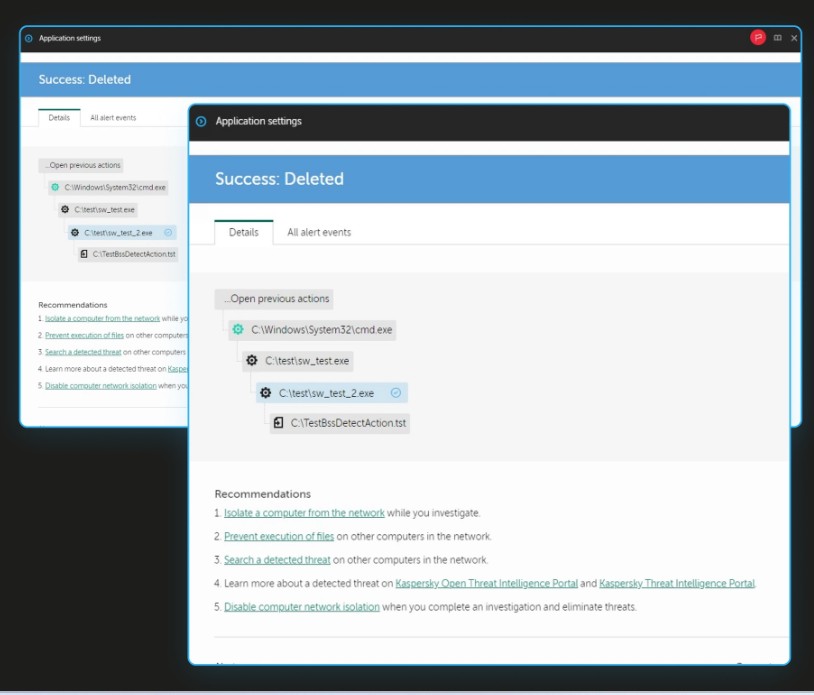
A threat was detected . Now what?
Simply follow the recommended steps in the alert card to find the root cause, isolate the host, and prevent the file from being executed in the future.
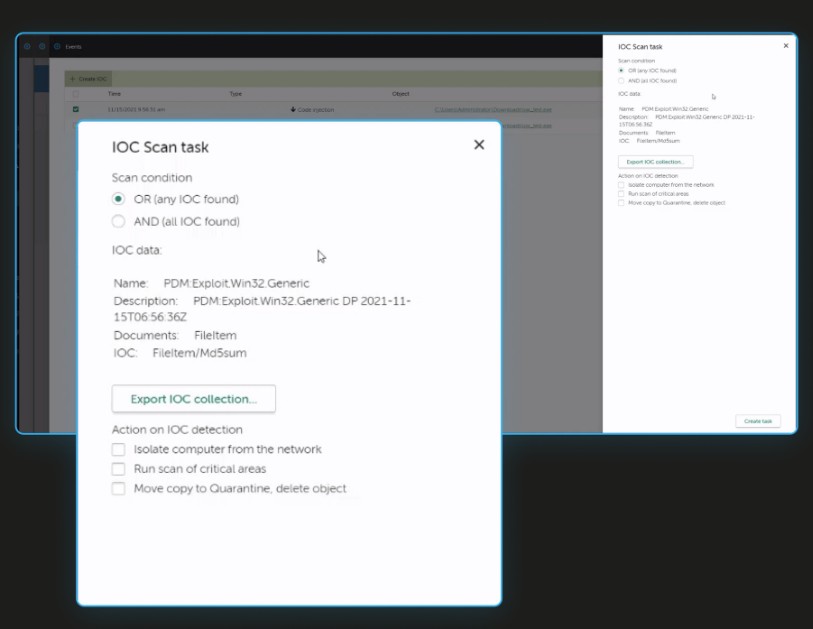
Companies like yours are experiencing an attack
Download the malicious file hash associated with this attack from securelist.com (or other sources) and run an Indicator of Compromise (IoC) scan across endpoints to locate hiding threats.
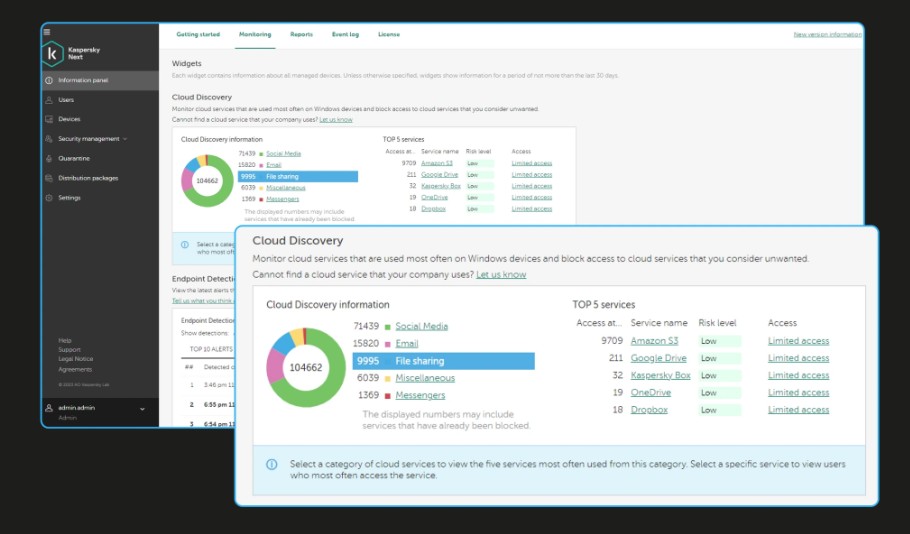
Cloud service usage is out of control
Learn what cloud services are being accessed and block unauthorized use to control shadow IT. Find sensitive data stored in Microsoft 365 apps.
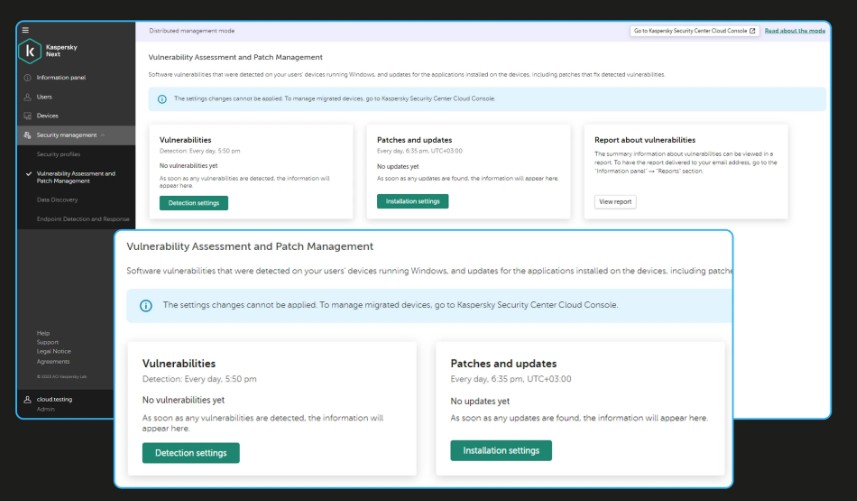
Routine tasks are wasting your time
Centralize vulnerability, patches and encryption management to save time and employ automation to adapt system hardening to the behavior of your users.
Choose the ideal Kaspersky Next plan for your business
Compare and contrast Kaspersky’s security plans for business to help you choose the right product for your needs
| Features | Kaspersky Next EDR Foundations | Kaspersky Next EDR Optimum |
|---|---|---|
| Provides core protection and controls for all your endpoints. | Intermediate security offering simplicity and automation. | |
| Number of protected devices | Any combination of desktop machines or file servers x5 Mobile device licenses included x10 | Any combination of desktop machines or file servers x5 Mobile device licenses included x1 |
| Included services | No add-ons provided | Microsoft Office 365 Protection x8 Cybersecurity training |
| IT Specialists | Required 1 | Required 1-2 |
| Time to control | 15 mins weekly | 15 mins weekly |
| Malware protection | Y | Y |
| Host Intrusion Prevention | Y | Y |
| Mobile Protection and Management | Y | Y |
| Adaptive Anomaly Control | - | Y |
| Ransomware Protection | Y | Y |
| Automatic Safe-State Reversion | Y | Y |
| Firewall | Y | Y |
| Network Threat Protection | Y | Y |
| Cloud Discovery | Y | Y |
| Cloud Blocking | - | Y |
| Microsoft Office 365 Security | - | Y |
| Data Discovery | - | Y |
| Web & Device Control | Y | Y |
| Application Control | Y | Y |
| Vulnerability Management | Y | Y |
| Patch Management | - | Y |
| Encryption Management | - | Y |
| Root Cause Analysis | Y | Y |
| Single-click Response | - | Y |
| Automated Response | - | Y |
| IoC Scan | - | Y |
In this guide
- From detection to response
- Cloud or on-premises deployment
- Controlling cloud use and attack surface
- Incident response for small IT teams
- Choosing a plan and rolling it out with Win-Pro
- Common mistakes when adopting EDR
- What to check during a pilot
- How EDR fits with managed IT services
- Keeping your detections useful
- A short checklist before you go live
- Frequently asked questions
From detection to response
Detection is only useful when your team can act on it quickly. Kaspersky Next EDR Optimum is built around three steps: understand the threat, fight it and find what is hidden. The product records the path a threat took across an endpoint and presents the root cause analysis in a single alert card, so your team does not have to piece together logs from several screens.
Guided response matters most for small teams. Instead of starting from scratch, staff follow the recommended steps in the alert card to isolate a host and stop a file from running again. Automation handles repetitive steps, so the response stays consistent even when the person on duty is not a specialist.
Cloud or on-premises deployment
Kaspersky states that the product can run in the cloud or on-premises. Cloud deployment reduces the hardware and maintenance you carry, which helps control the total cost of ownership. On-premises deployment suits businesses that need full control over where security data is held, or that have policies against cloud management tools.
Ask your Win-Pro consultant which option fits your data policy before you sign. Changing deployment later takes planning, so decide early and record the reason.
Controlling cloud use and attack surface
Staff often sign up for cloud tools without telling IT. This shadow IT creates data risks that traditional antivirus does not see. The product shows which cloud services are being accessed and can block use that is not approved, so you can bring unmanaged apps back under control.
The product also looks for sensitive data stored in Microsoft 365 apps, which is useful for businesses that handle customer records or payroll. Pair these checks with a clear list of approved apps and a short review each quarter, so policy keeps pace with how people work.
Incident response for small IT teams
Many Singapore businesses have one or two IT staff who handle security work alongside daily support. A typical incident starts with an alert about a suspicious file on one laptop. The team follows the alert card to find the root cause, isolates the host from the network and blocks the file from running again.
The team then uses the file’s hash from a trusted threat research source to run an indicator of compromise (IoC) scan across all endpoints. The scan shows whether the same file is hiding on other machines. The process takes time, but it follows the same steps each time, which builds skill without a large time commitment.
Choosing a plan and rolling it out with Win-Pro
Kaspersky offers several Next plans, so compare them first. Match the plan to the features your team needs, such as EDR, cloud controls and vulnerability and patch management. Count your endpoints, your cloud apps and the hours your IT staff can spend on security each week.
Win-Pro can assess your current endpoints, deploy the agents, set up alert handling and train your staff on the response steps. We also set a review schedule for alerts and policy changes, so the product keeps working after the first month. Contact us for a short review and a written cost comparison before you choose a plan.
Support is part of the decision as well. Check who answers your calls, which hours are covered and whether the local team can visit your office in Singapore, Johor Bahru or Kuala Lumpur if an incident needs hands-on work. Write these commitments into the agreement.
Common mistakes when adopting EDR
The most common mistake is buying EDR and expecting it to run itself. Alerts need an owner, a response time and a review, otherwise they pile up unread. Name the person who checks alerts each day, and name a backup for leave days.
A second mistake is switching on every policy at once. Start with monitoring mode on a pilot group, review what the tool flags, and tighten rules once you understand normal behaviour. This avoids blocking legitimate work in the first week.
The third mistake is treating an isolated host as solved. Isolation stops the spread, but the root cause still needs fixing. Record what happened, close the entry point, and update your staff guide so the next response is faster.
What to check during a pilot
A pilot tells you more than any brochure. Choose a group of ten to twenty endpoints that represent your business, including a laptop used for finance, a sales laptop and one server if you have one. Run the product for two to four weeks before you widen the rollout. Keep a list of the pilot devices so you can check their status each week.
During the pilot, measure four things: how many alerts arrive each day, how many are genuine, how long your team takes to respond, and whether any legitimate business application was blocked. Record the answers in writing so the decision to roll out is based on evidence.
How EDR fits with managed IT services
EDR works best when someone watches it every day. Many small teams cannot staff a security desk, so alerts go unread. A managed service covers monitoring, first-line triage, updates and reporting, so your team only handles the incidents that need a decision.
Ask any provider, including Win-Pro, who responds to an alert at night and at weekends, how quickly they respond, and what they will escalate to you. Put those answers in your service agreement so expectations are clear before an incident happens.
Keeping your detections useful
Detection rules drift as your business changes. A new cloud app, a new staff member or a new supplier can all cause harmless alerts. Review the rules every quarter, remove those that generate noise, and keep the ones that catch real activity.
Share lessons with staff too. When an alert turns out to be a false positive, explain why in a short note. Over a year, these notes become a practical record that new staff can learn from, and they reduce the time spent on the same questions.
A short checklist before you go live
Before the full rollout, check these points with your team. Each one takes minutes to confirm and prevents common problems later.
- Every endpoint in the pilot reports to the console.
- Each alert type has a named owner and a response time.
- Staff know how to isolate a host and who to call if they cannot.
- Approved cloud apps are listed, and exceptions have a documented reason.
- Backup and recovery steps are tested, so a restored machine returns to a known state.
- Monthly reports go to management, and the first review date is in the calendar.
Tick off each point in writing. A checklist signed off by the owner of IT is the simplest proof that the rollout was planned, and it gives you a clear reference for future audits.
Frequently asked questions
What is Kaspersky Next EDR Optimum?
Endpoint detection and response plus endpoint protection, built for growing businesses.
What does EDR mean?
Software that records activity on laptops and servers, so teams can investigate and respond to threats.
Is it suitable for small IT teams?
Yes. Guided response and automation shorten the time each incident takes.
Can it run in the cloud?
Kaspersky states that it can, and it can also be installed on-premises.
What is a root cause analysis?
A review of how a threat got in and moved, so you can close the entry point.
What is an indicator of compromise?
A sign of an attack, such as a file hash or network address linked to a known threat.
Does it control cloud apps?
It shows which cloud services are used and can block unapproved ones.
Can it find sensitive data in Microsoft 365?
Yes, it can locate sensitive data stored in Microsoft 365 apps.
Does it cover patch management?
It includes vulnerability, patch and encryption management. Check which features your plan includes.
Does it include training?
Kaspersky states that built-in cybersecurity training is available for IT staff.
How does it support PDPA compliance?
It helps you detect and respond to incidents involving personal data. PDPA also requires policies, training and breach notification processes.
How do I choose a plan?
Compare each plan’s features with your endpoints, cloud use and team skills.
Will it slow my computers?
The impact depends on configuration and hardware, so test with a pilot group first.
How long does rollout take?
It depends on the number of endpoints. Plan a pilot first, then a staged rollout.
Can Win-Pro manage it?
Yes, as part of our managed IT services: deployment, configuration, monitoring and maintenance.
Don’t wait! Prevent tomorrow’s threats today
Recovery from a malicious attack can be devastating to a small business. Kaspersky Next EDR Optimum lets you use your money for business development, not incident recovery.