

Microsoft Teams Premium
- Focus on what matters most with AI-powered meetings and calls
- Reimagine flexible work and grow your business with personalized experiences.
- Add an extra layer of protection to sensitive meetings.
Requires a Teams license. Queues app requires a Teams Phone license.

In this guide
- Who needs Teams Premium?
- How Teams Premium differs from Teams
- AI-powered meetings, notes and summaries
- Engaging events, branding and call queues
- Protecting sensitive meetings
- Singapore PDPA and data protection
- Before you switch Teams Premium on: a short checklist
- How Win-Pro helps you roll out Teams Premium
- Frequently asked questions
Discover Teams Premium

More intelligent

More engaging

More protected
Features
Explore Teams Premium
More intelligent
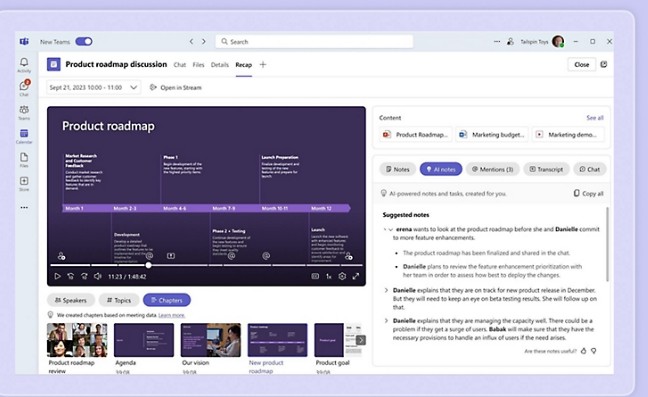
Work smarter with AI-powered meetings and calls
Stay focused on the discussion with real-time notes and action items, and quickly catch up on anything you missed with detailed summaries.
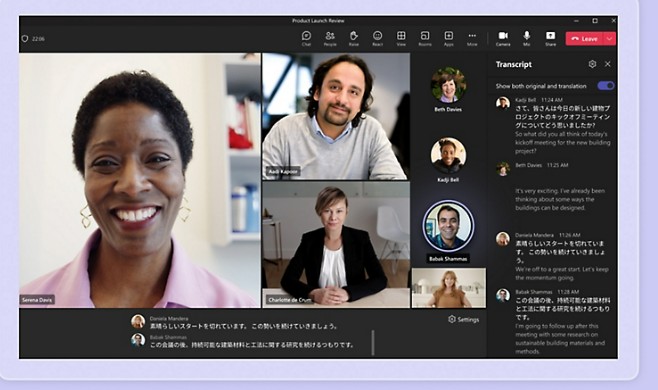
Translate in real time
Break down language barriers and support global teamwork with live translation of captions and transcripts.
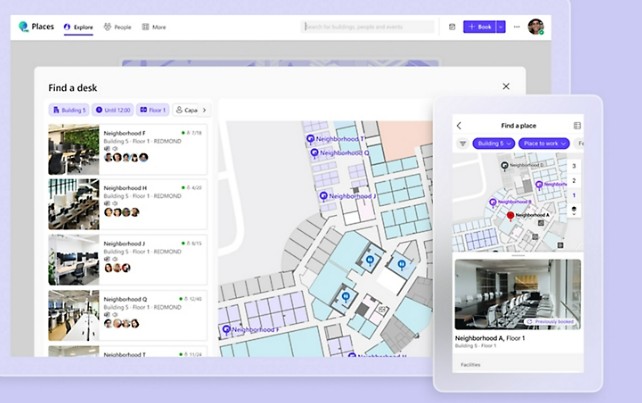
Book the right places
Reserve the right rooms, desks, or work areas to meet your needs using Places Finder, or ask Microsoft 365 Copilot1 to manage your bookings in Microsoft Places.
More engaging
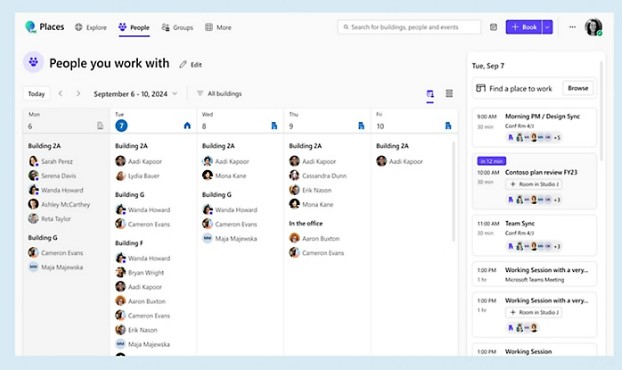
Reimagine flexible work with AI
Know where to work to achieve the right outcomes. Coordinate and manage schedules with Microsoft Places to enable valuable in-person collaboration.
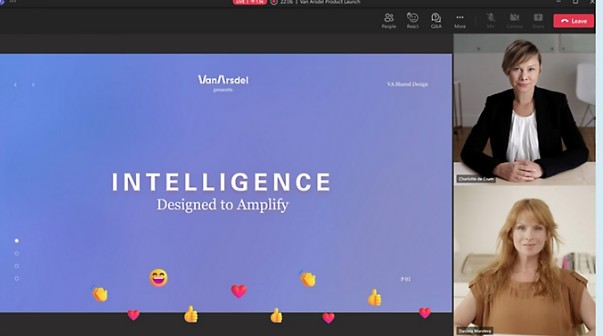
Host branded, large-scale events
Engage audiences with professionally produced events, including advanced webinars, town halls, and immersive 3D experiences.
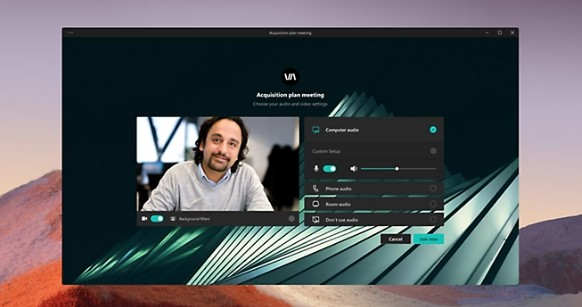
Make collaboration more personal and showcase your brand
Incorporate your organization’s logo and colors, and use AI to personalize your meeting background in a new style.
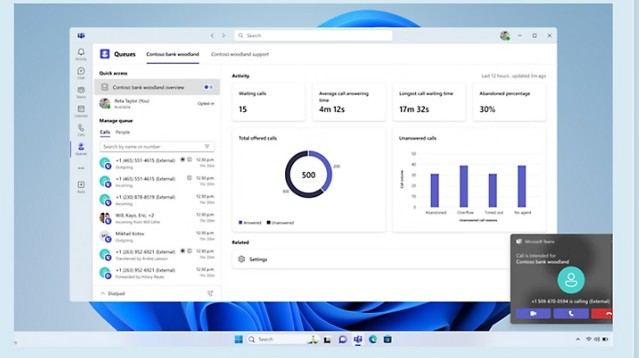
Easily manage call queues
Enable collaborative call handling designed for efficiency and improved customer care, with tailored experiences for queue members and leads.
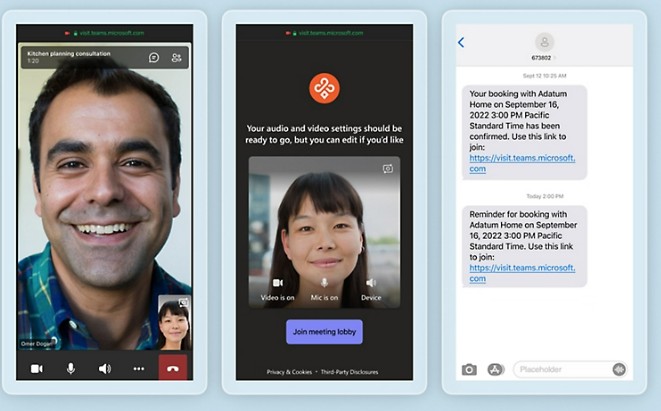
Create personalized customer experiences
Deliver seamless end-to-end experiences with Virtual Appointments in Microsoft Teams, from text message reminders and branded lobby rooms to post-appointment surveys.
More protected
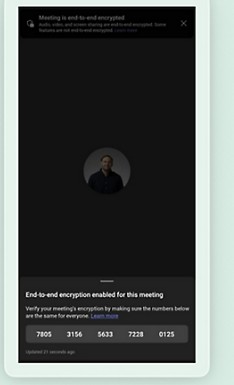
Increase confidentiality with more meeting options
Designate who can record meetings, and enable end-to-end encryption for online meetings that require a higher level of protection.
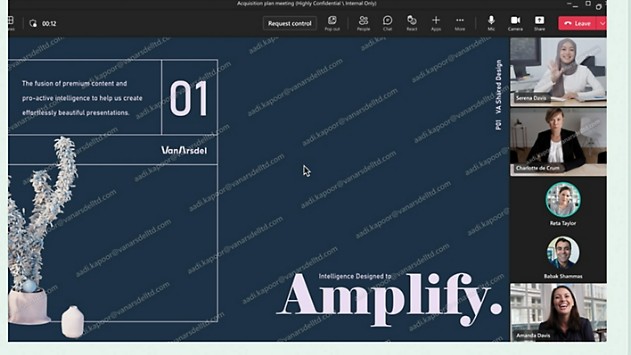
Help deter leaks with watermarking
Watermark shared content and video feeds to help prevent leaks and keep sensitive information inside meetings.
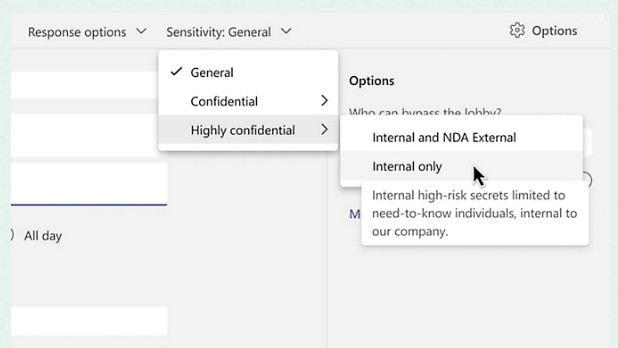
Automate meeting protection with sensitivity labels
Customers with a Microsoft 365 E5 subscription can apply sensitivity labels to automatically add meeting options that help protect information.
Who needs Teams Premium?
Teams Premium suits organisations that run many meetings, webinars or customer calls, and that need stronger control over confidential discussions. A small team that mostly uses Teams for chat and short calls may never use the extra features. A sales team hosting client appointments, an HR team running town halls, or a finance team discussing sensitive numbers often gets much more value from them.
Before you buy, check who will use the features each day. Licences add up quickly when you assign them to every user, so start with the people who will benefit first.
Sales and service teams often find value first, because they run many short calls and appointments each week. Finance, legal and HR teams usually benefit from the protection features, since their meetings include information that must stay confidential. Management teams that present to staff across several sites may gain most from the events features.
How Teams Premium differs from Teams
Standard Microsoft Teams already handles chat, meetings, calls and file sharing. Teams Premium builds on that base with AI features that help people focus during meetings, richer event and customer experiences, and extra meeting controls that help protect information. It also unlocks premium capabilities linked to Microsoft Places, Queues, Virtual Appointments, webinars, town halls and Microsoft Mesh.
Standard Teams keeps your people connected. Teams Premium helps them get more from each conversation and keeps those conversations safer.
The three headline areas on this page are intelligence, engagement and protection. Each one answers a common business problem: meetings that lose focus, events and client conversations that feel generic, and confidential information that is shared too widely. Looking at the three together helps you decide whether the whole package fits your business, or whether one or two features are enough.
AI-powered meetings, notes and summaries
Meetings often end with people unsure what was agreed. Teams Premium produces real-time notes and action items during the call. Anyone who joins late can read a detailed summary instead of asking colleagues to repeat what they missed.
Live translation of captions and transcripts helps teams that work across languages follow the same discussion without waiting for a written recap. Translation quality depends on the language and the audio, so run a test meeting before you rely on it for anything important.
AI summaries can miss context, so the meeting owner should review notes before sharing them. A quick check keeps the record accurate.
Engaging events, branding and call queues
Teams Premium supports larger, more polished events. Webinars, town halls and immersive 3D experiences can be produced with a professional look, which helps when you present to clients, partners or staff across several sites.
Your organisation’s logo and colours can appear in meeting backgrounds, so client meetings feel consistent with your brand. Call queues let a group of agents share incoming calls with clear routing, which suits helpdesks and customer care teams. The Queues app requires a Teams Phone licence as well, so confirm your setup first.
Virtual Appointments add a booking flow with text reminders, branded lobby rooms and post-appointment surveys. This works well for consultations, demos and service visits.
Protecting sensitive meetings
Some meetings should never leak. Teams Premium lets you decide who can record a meeting, and it can enable end-to-end encryption for meetings that need a higher level of protection. Watermarking shared content and video feeds discourages copying outside the meeting and helps trace a leak to its source.
If your organisation uses Microsoft 365 E5, sensitivity labels can apply meeting options automatically, so protection does not depend on each person remembering the settings. Pair these controls with clear meeting rules about who may attend and what can be shared. A feature cannot replace good habits.
Review these settings once a quarter, especially after staff changes, so that people who no longer need access to sensitive meetings are removed.
Singapore PDPA and data protection
Under Singapore’s Personal Data Protection Act, organisations must protect personal data in their care and make reasonable security arrangements. Meeting recordings, transcripts and AI summaries can contain personal data, so they need the same care as email and files.
Before you turn on recording, transcription or AI summaries, decide what your business keeps, where it is stored, who can access it and how long it is kept. Put the answers in a short written policy and tell staff about it. You can review the guidance from the Personal Data Protection Commission. Win-Pro can check your Microsoft 365 settings against your policy, but your business remains responsible for compliance.
Before you switch Teams Premium on: a short checklist
Start by listing the meeting types your business runs each week, such as client calls, internal stand-ups, webinars, town halls and customer appointments. Each type can use different Teams Premium features, so the list tells you which features to switch on first.
Next, confirm licences. Every user who needs Teams Premium features must hold a Teams licence, and anyone using Queues also needs Teams Phone. Check this before rollout, because a user without the right licence sees missing options, which confuses people.
Then decide your recording and transcription rules. Choose who can record, where recordings are saved, how long they are kept and who can download them. Write these answers down so that every admin applies the same settings.
Pilot with one team for two weeks. Ask them which summaries were accurate, which translations needed correction and which protection settings slowed their work. Fix those points before a wider rollout.
Finally, measure whether it helped. Track how long meeting follow-ups take, how often people ask for missed notes and how smoothly events run. Simple numbers show whether the licence cost is earning its place.
Teams Premium works best when it is treated as a change to how people meet, not only a new licence. Set the rules, train the team and review the results every quarter. Win-Pro can guide that process from the first review to ongoing support.
How Win-Pro helps you roll out Teams Premium
A licence alone does not change how a team works. A good rollout starts with a review of your current Teams and Microsoft 365 setup, then a pilot group, clear settings and a short training session. We review licences, meeting policies, recording settings and the protection features that matter most to your business, so you pay only for what you use.
Once Teams Premium is live, ongoing support matters. Our IT managed services keep your Microsoft 365 environment updated and monitored, and our IT helpdesk services answer questions as your team learns the new features. If you are still choosing your base plan, see our guide to Microsoft 365 Business Standard, which includes the Teams licence that Teams Premium requires.
Frequently Asked Questions about Microsoft Teams Premium
Microsoft Teams Premium
Teams Premium is an add-on to Teams that adds AI meeting features, richer events, branded experiences and extra meeting protection on top of the standard Teams experience.
Do I need a Teams licence to use Teams Premium?
Yes. Teams Premium requires a paid Teams licence.
What is the difference between Teams and Teams Premium?
Standard Teams covers chat, meetings and calls. Teams Premium adds AI notes, live translation, branded backgrounds, larger events and extra protection features.
Does Teams Premium create meeting notes and action items?
Yes. It produces real-time notes and action items, plus detailed summaries for anyone who misses a meeting.
Can Teams Premium translate meetings?
It offers live translation of captions and transcripts for teams that work across languages.
What are Teams Premium webinars and town halls?
These are advanced event features for larger, professionally produced events, covering creation and management from start to finish.
Can I add my company logo and colours to meetings?
Yes. You can add your organisation’s logo and colours and personalise meeting backgrounds.
What are call queues in Teams Premium?
Call queues give customer care and helpdesk teams shared call handling. The Queues app requires both a Teams Phone licence and a Teams Premium licence.
What are Virtual Appointments?
Virtual Appointments are booking-based customer meetings with text reminders, branded lobby rooms and post-appointment surveys.
Can I stop people recording meetings?
Yes. You choose who is allowed to record.
What is end-to-end encryption in meetings?
It is an option for meetings that need a higher level of protection.
How does watermarking help?
It watermarks shared content and video feeds, which helps deter leaks and trace them to a source.
Do I need Microsoft 365 E5 for sensitivity labels?
Customers with a Microsoft 365 E5 subscription can apply sensitivity labels that add meeting protection options automatically.
Is Teams Premium compliant with the PDPA?
Teams Premium is a tool. Compliance depends on how your business configures and uses it, so we can help you review settings against your policy.
How can Win-Pro help me get started?
We review your licences and settings, run a pilot group, train your users and provide ongoing IT support.